
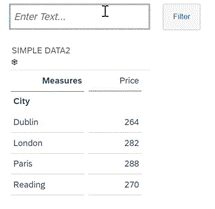
This script allows users to filter a table by entering a search string in an Input Field.
You could enhance this to search for Strings that exactly match the entered value, in this example we filter on values that include the search string anywhere in the Dimension Member description.
// get the value entered in the input field , set it to lower case)
var IF1_VAL = InputField_1.getValue().toLowerCase();
// create an empty text array variable: MATCHES
var MATCHES=[""];

// Get the first dimension in the table
var DIM = Table_3.getDimensionsOnRows()[0];
// remove any existing dimension filter on the table
Table_3.getDataSource().removeDimensionFilter(DIM);
/*
 - Loop through the members of DIM (location in this example)
 - Populate the variable DESC with the description value of the dimension member - MEM variable.
 - At each loop push the DESC value into the array 'MATCHES' if it matches the text string entered in the
    input field
*/
if(IF1_VAL.length >0)
	{ var selections = Table_3.getDataSource().getDataSelections();
                 for (var i=0;i<selections.length;i++)
                   { var MEM = Table_3.getDataSource().getResultMember(DIM,selections[i]);
                      var DESC = MEM.description.toLowerCase(); // set dimension description to lower case
                          var DESC2 = MEM.description;
// new var to take the case unformatted description - DESC2 will be pushed to the final filter array
if(DESC.includes(IF1_VAL))
// DESC2 is now used so that the values used in the filter match the actual dimension member description values
{MATCHES.push(DESC2);  	}}
// Filter the table on the dimension DIM (location) with the values found in the array  MATCHES
if(MATCHES.length-1 >0) // Needed in case nothing matches the search string
	{ Table_3.getDataSource().setDimensionFilter(DIM,MATCHES); }}
Code language: JavaScript (javascript)