
This script allows us to swap dimensions in & out of a table on 2 rows, it ensures each dropdown list contains a unique list of dimensions
Trying to add the same dimension twice to a table; inevitably will result in a SAC script error.
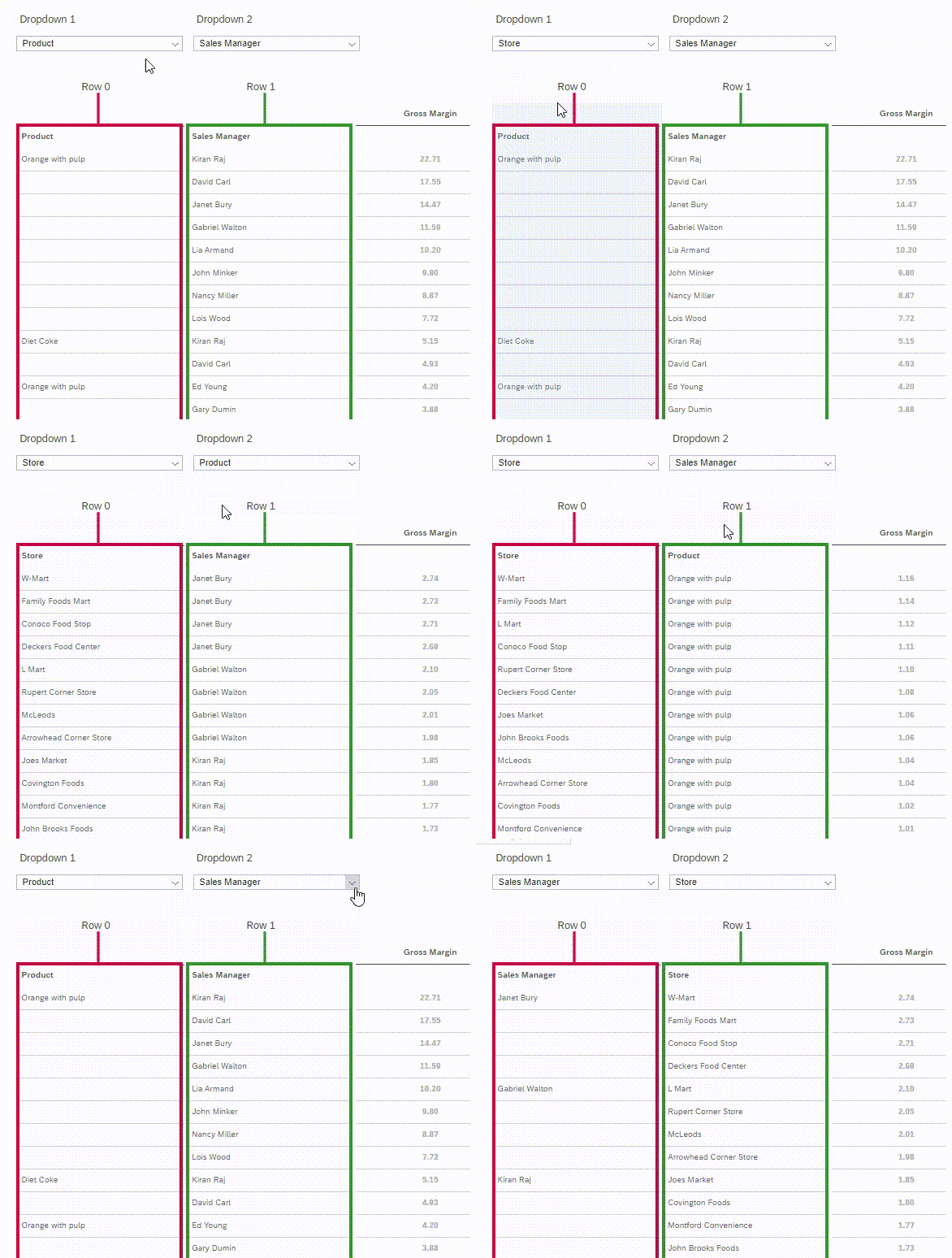
In the graphic below we can see that the value selected in a drop down list will be removed from the other drop down.
Example:
If the current value in Drop down 1 is ‘Product’ and we then selected ‘Store’ in Drop down 1
Store will no longer be available for selection in Drop down 2 However Product will now be available for selection in Drop down 2
Components
Widgets
Dropdown_1
Dropdown_2
Table_1
Global Script Variables
ALL_DIMS Type: DimensionInfo Set As Array: YES
DIM1 Type: String
DIM2 Type: String
Page onInitialization script
/* I use this code onInitialization to grab the dimensions present  in the table at runtime and write them to global variables */
// Get the dimension in the first row (visually column 1)
DIM1 = Table_1.getDimensionsOnRows()[0];
// Get the dimension in the second row (visually column 2)
DIM2 = Table_1.getDimensionsOnRows()[1];
// Get all the dimensions from the data source
ALL_DIMS = Table_1.getDataSource().getDimensions();

// Loop through all dimensions in the query and them all  to both dropdowns
for (var i=0;i<ALL_DIMS.length;i++)
	{ Dropdown_1.addItem(ALL_DIMS[i].id,ALL_DIMS[i].description);
                   Dropdown_2.addItem(ALL_DIMS[i].id,ALL_DIMS[i].description); }
//-----------------------------------------------------------------------------------------------------------------------------------------
/* This code ensures the drop down shows the correct dimension that  corresponds to the table (e.g. drop down 1 shows the dimension in  column 1 & doesn't contain the dimension in column 2)    */
     // Remove the dimension in the 2nd table row from this dropdown
    Dropdown_1.removeItem(DIM2);
     // set the selected Dropdown value to DIM1
    Dropdown_1.setSelectedKey(DIM1);
     // Remove the dimension in the 1st table row from this dropdown
    Dropdown_2.removeItem(DIM1);
     // set the selected Dropdown value to DIM2
     Dropdown_2.setSelectedKey(DIM2);

Code language: JavaScript (javascript)// Remove DIM1 from the table (the dimension in the first row)
Table_1.removeDimension(DIM1);
// Get the dimension value selected in this dropdown and store it in the variable 'SELECTED1'
var SELECTED1 = this.getSelectedKey();
/*
1. This code below removes all values from Dropdown 2, then adds them all back into it.
2. # The mutually exclusive bit #
It then removes the dimension selected (SELECTION1) in Dropdown1 from Dropdown 2
3. It then sets the dropdown2 selected key to the dimension value stored in the variable 'DIM2' */
Dropdown_2.removeAllItems();
for (var i=0;i<ALL_DIMS.length;i++)
{Dropdown_2.addItem(ALL_DIMS[i].id,ALL_DIMS[i].description);}
Dropdown_2.removeItem(SELECTED1);
Dropdown_2.setSelectedKey(DIM2); // DIM2 is the global variable
// Set the Global variable DIM1 to the value selected in dropdown 1 (SELECTED1)
DIM1=SELECTED1;
// Add DIM1 to row 0 of the table
Table_1.addDimensionToRows(DIM1,0);
Code language: JavaScript (javascript)Table_1.removeDimension(DIM2);
var SELECTED2 = this.getSelectedKey();
Dropdown_1.removeAllItems();
for (var i=0;i<ALL_DIMS.length;i++)
{Dropdown_1.addItem(ALL_DIMS[i].id,ALL_DIMS[i].description);}
Dropdown_1.removeItem(SELECTED2);
Dropdown_1.setSelectedKey(DIM1);
DIM2=SELECTED2;
Table_1.addDimensionToRows(DIM2,1);
Code language: JavaScript (javascript)