
In this example the script is placed in the button
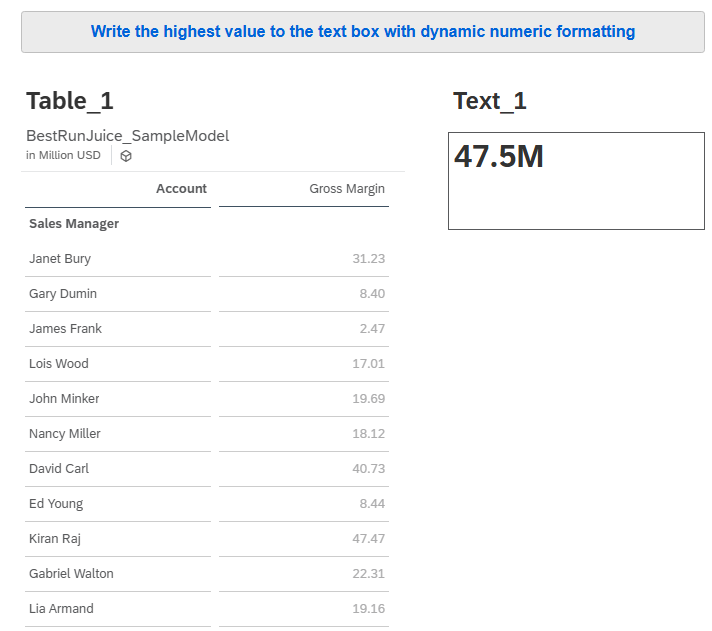
// Get the result set from the table's data source
// This returns all rows currently visible in the table (after filters, etc.)
var resultSet = Table_1.getDataSource().getResultSet();

if (resultSet.length > 0)
{
    var initialvalue = ConvertUtils.stringToNumber(resultSet[0]["@MeasureDimension"].rawValue);
    // take the first value in the result set as the starting point

// Loop through every row in the result set
// resultSet.length = number of rows returned from the table
for (var i = 0; i < resultSet.length; i++) {

	// Extract the measure value from the current row
	// rawValue returns the underlying numeric value
	// ConvertUtils.stringToNumber ensures the value can be used in numeric comparisons
	var currentValue = ConvertUtils.stringToNumber(resultSet[i][Alias.MeasureDimension].rawValue);


	// Compare the current row's value with the lowest value found so far
	// If it is smaller, replace the stored lowest value

	// JUST SWAP THE >   TO <  ON LINE 24 FOR THE LOWEST VALUE INSTEAD
	if (currentValue > initialvalue) {
		initialvalue = currentValue;
	}
}


// -------- Compact formatting --------


// Get the absolute value of the lowest number
// This allows correct formatting even if the value is negative
var absoluteValue = Math.abs(initialvalue);


// Initialise suffix that will indicate scale (K, M, B)
var scaleSuffix = "";


// Initialise scaledValue with the original value
// This will later be divided if the value needs scaling
var scaledValue = initialvalue;


// If the number is greater than or equal to 1 billion
// Divide by 1 billion and add "B" suffix
if (absoluteValue >= 1000000000.0) {
	scaledValue = initialvalue / 1000000000.0;
	scaleSuffix = "B";
}


// If the number is greater than or equal to 1 million
// Divide by 1 million and add "M" suffix
else if (absoluteValue >= 1000000.0) {
	scaledValue = initialvalue / 1000000.0;
	scaleSuffix = "M";
}


// If the number is greater than or equal to 1 thousand
// Divide by 1 thousand and add "K" suffix
else if (absoluteValue >= 1000.0) {
	scaledValue = initialvalue / 1000.0;
	scaleSuffix = "K";
}


// Round the scaled value to one decimal place
// Example: 4.567 → 4.6
var roundedValue = Math.round(scaledValue * 10.0) / 10.0;


// Convert the number to text and append the scale suffix (K/M/B)
// Example output: "4.6M"
var formattedTextValue = ConvertUtils.numberToString(roundedValue) + scaleSuffix;


// Write the formatted value into the text widget on the story page
Text_1.applyText(formattedTextValue); }
Code language: JavaScript (javascript)