
I get asked this far too regularly
The simple answer is, learn by doing & having a go.
Useful links
SAC Learning
– SAP Analytics Cloud free trial
– Exploring SAP Analytics Cloud – SAP Learning
– Exploring Development Options in SAP Analytics Cloud
Community
– SAP SAC Community Forum
Design UX/UI
– Gestalt Principles
– International Business Communication Standards
– Graphic Design Principles
There isn’t really a shortcut, but there is a fairly straightforward route I’d recommend.
1. Get access to an SAC tenant
This is the most important step.
If your organisation already uses SAP Analytics Cloud, try to get access to a development or sandbox environment where you can actually build things.
If you don’t have access through work, SAP provides a free basic trial:
SAP Analytics Cloud free trial
You can watch all the videos and read all the documentation you like, but ultimately you learn SAC by using SAC.
2. Complete the free SAP learning content
A good starting point is SAP’s Exploring SAP Analytics Cloud course.
Exploring SAP Analytics Cloud – SAP Learning
It covers the fundamentals: navigation, connections, modelling, stories, planning and augmented analytics.
Don’t just work through the material passively. Have SAC open alongside it and recreate what you’re learning.
3. Build something from scratch
This is where the real learning starts.
Take a dataset you understand and build a small end-to-end solution:
Data → Model → Story → Dashboard
Create dimensions and measures. Build calculations. Add filters and input controls. Experiment with different visualisations. Break things. Work out why they broke.
Try to create something that another person could genuinely use rather than simply reproducing a training exercise.
4. Learn dashboard design, not just SAC
Knowing where the chart button is doesn’t make someone a good SAC developer.
Learn the fundamentals of:
• Data visualisation
• Dashboard UX/UI
• Information hierarchy
• Chart selection
• Colour and contrast
• Gestalt principles
• Designing for the question the user actually needs answering
A technically impressive dashboard can still be a terrible dashboard.
5. Move beyond basic stories
Once you’re comfortable with standard SAC functionality, start exploring the more advanced capabilities.
Learn things such as:
• Calculated and restricted measures
• Advanced filtering
• Linked analysis
• Hierarchies
• Story calculations
• Optimised Story Experience
• Performance considerations
• Scripting and extended stories
SAP also has a dedicated learning journey covering SAC development, scripting and custom widgets:
Exploring Development Options in SAP Analytics Cloud
6. Understand what sits behind SAC
If you want to move from simply building dashboards to being a strong SAC consultant or architect,
you need to understand the wider architecture.
Learn the difference between: Import vs Live connectivity and understand how SAC interacts with
things such as: S/4HANA → BW → Datasphere / Business Data Cloud → SAC
You don’t need to become an expert in every SAP product, but you should understand where SAC fits and where the data and semantic logic should live.
7. Learn administration and governance
This is an area many people skip.
Understand:
• Users, teams and roles
• Folder and object security
• Data access
• Connections
• Content transport
• Authentication / SSO
• Lifecycle management
• Performance and governance
SAP provides a separate learning journey for this: Administrating SAP Analytics Cloud
8. Build. Break. Fix. Repeat.
This is probably the most important part.
Give yourself increasingly difficult problems:
“Can I make this dimension dynamic?”
“Can I switch measures?”
“Can I make this dashboard responsive?”
“Can I automate this interaction?”
“Why is this story slow?”
“How would I design this for 5,000 users rather than five?”
Working through those problems is where you move from knowing SAC functionality to actually understanding the product.
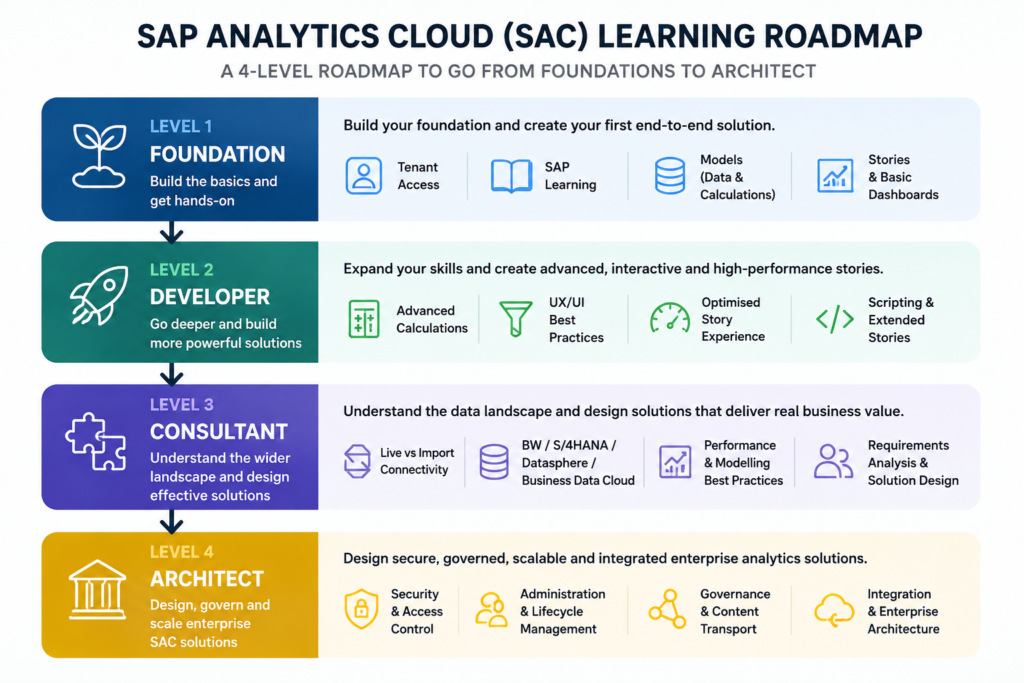
Suggested SAC learning roadmap:
Foundation
Tenant access → SAP Learning → Models → Stories
Developer
Advanced calculations → UX/UI → Optimised Stories → Scripting
Consultant
Live connectivity → BW/S/4/Datasphere → Performance → Requirements & design
Architect
Security → Administration → Governance → Integration → Enterprise architecture
Certification can validate your knowledge.
Hands-on experience is what actually builds it.
Obligatory AI Infographic