
CSS
SAC CSS Engine
In SAC, the CSS engine expects explicitly defined styles, especially for compound shorthand properties like border, border-top, etc.
SAC requires all 3 properties to be set e.g. for a border:
border: [width] [style] [color];
.my-css-class .sap-custom-panel-widget { border-top: 2px solid rgb(255, 0, 0); }
Outer CSS Classes
When you open the CSS menu and select any Widget from the dropdown menu, SAC will always show the ‘Widget CSS Class’ options.
This is the outer class for the widget, below this you will then see the widget specific inner class.
Outer class

Widget specific inner class (button in this example)

Styles
The CSS help / example for each Widget type doesn’t specify supported styles
e.g. For a panel widget it simply lists the supported classes – background-color, border etc.

It takes a bit of trial and error to find which styles work for each class & widget combination.
e.g. for borders:
Undocumented Style Parameters:
border: double
border: groove
border: ridge
border: solid
border: dashed
border: dotted
Colours
When assigning colours via a CSS class we can use
RGB – Red, Green, Blue
RGBA – Red, Green, Blue, Alpha (opacity)
HEX – Hexadecimal
Basic Colour typed – red , blue , orange etc.
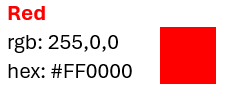
RGB or HEX is used when we only want to apply a solid colour e.g.
RGB
Each parameter (red, green, and blue) defines the intensity of the color between 0 and 255.
For example, rgb(255, 0, 0) is displayed as red, because red is set to its highest value (255) and the others are set to 0.
To display black, set all color parameters to 0, like this: rgb(0, 0, 0).
To display white, set all color parameters to 255, like this: rgb(255, 255, 255).
RGBA
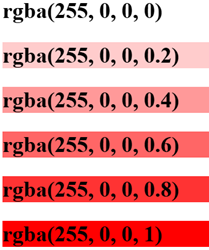
Is used when we want to define colour & opacity, the Alpha (A) value can be between 0 &1
e.g. rgba(255,0,0,0.2) sets the opacity to 20%
Script Examples