
Requirement
I want to filter a table by location using buttons e.g. Nevada , Oregon, California. I also want a dropdown so I can filter the table by Sales Manager – but the Sales Manager dropdown must only show managers for the state selected in the location filter, or all Sales Mangers if no location filter is applied.
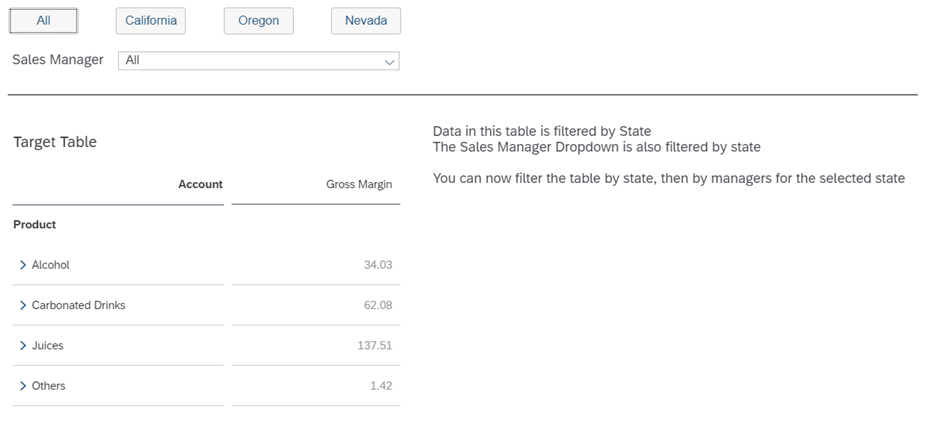
Dimensions: Location, Sales_Manager, Product
Tables: source ( a hidden table used as a lookup ) (contains all locations, managers & products)
target ( the table we see on screen that will be filtered )
Dropdowns: ddl_location ( a hidden dropdown list)
ddl_manager
Steps
1. Page onInitialization script: Populate the dropdown lists with values
// Add values to the location dropdown list: ddl_location
var location=source.getDataSource().getMembers("Location");
for (var l=0;l<location.length;l++)
{ddl_location.addItem(location[l].id,location[l].description);}
// Add values to the manager dropdown list
var manager=source.getDataSource().getMembers("Sales_Manager");
for (var k=0;k<manager.length;k++)
{ddl_manager.addItem(manager[k].id,manager[k].description);}


Code language: JavaScript (javascript)
2. ddl_manager onSelect() script:
If the dropdown value = All then remove the manager filter from the ‘target’ table, else filter the ‘target’ table with the manager value selected in the dropdown list.
var manager = ddl_manager.getSelectedKey();
if(manager==="All"){target.getDataSource().removeDimensionFilter("Sales_Manager");}
else {target.getDataSource().setDimensionFilter("Sales_Manager",manager);}
Code language: JavaScript (javascript)
3. Location buttons onSelect() Script:
This code passes the location value to the location dropdown list via ‘setSelectedKey’
It filters both tables (source & target) to the selected location
We then use ‘getSelections’ to push the manager matching the location value to the manager dropdown list
The code below is configured for the button ‘Nevada’ (it will need manually adjusting for each button)
//remove any previous manager filters on the target table target.getDataSource().removeDimensionFilter("Sales_Manager");
// remove all values from ddl_manager
ddl_manager.removeAllItems();
ddl_manager.addItem("All");
ddl_manager.setSelectedKey("All");
//Set ddl_location value to 'Nevada'  >> this line is the only one you need to edit for each Button
ddl_location.setSelectedKey("[Location].[State_47acc246_4m5x6u3k6s].&[SA2]");
//Filter the source table with the selected value from ddl_location to: 'Nevada'
source.getDataSource().setDimensionFilter("Location",ddl_location.getSelectedKey());
target.getDataSource().setDimensionFilter("Location",ddl_location.getSelectedKey());
var selections =source.getDataSource().getDataSelections({"Location":ddl_location.getSelectedKey()});
var memberids =  ArrayUtils.create(Type.string);
var memberids1 = ArrayUtils.create(Type.string);
for(i=0;i<selections.length;i++) {
	var member = source.getDataSource().getResultMember("Sales_Manager",selections[i]); 	memberids.push(member.id);
	memberids1.push(member.description);
 	for (var i=0;i<memberids1.length;i++){
		ddl_manager.addItem(memberids[i],memberids1[i]);
	}	}


Code language: JavaScript (javascript)
4. All button onSelect() Script:
// remove the location filter from the source table
source.getDataSource().removeDimensionFilter("Location");

// remove all values from the manager dropdown list
ddl_manager.removeAllItems();

// remove the location & sales_manager filter from the source table
target.getDataSource().removeDimensionFilter("Location");
target.getDataSource().removeDimensionFilter("Sales_Manager");

// add the value ‘ All’ to the manager dropdown list
ddl_manager.addItem("All");
//loops through all sales manager values and adds them back to the manager dropdown list
var manager=source.getDataSource().getMembers("Sales_Manager");
for (var k=0;k<manager.length;k++)
	{ddl_manager.addItem(manager[k].id,manager[k].description);}
//sets the manager dropdown list value to ‘All’
ddl_manager.setSelectedKey("All");


Code language: JavaScript (javascript)