
In this example the script is placed in the button
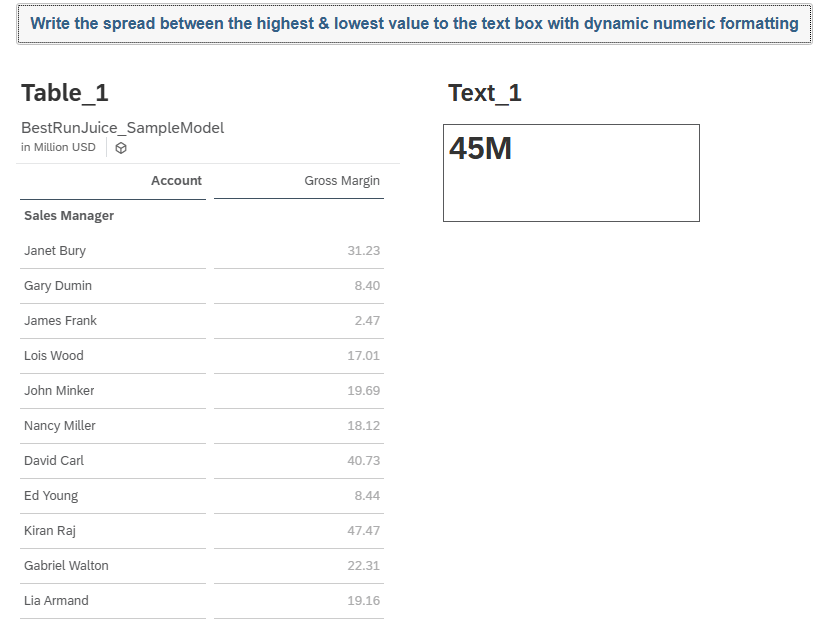
// Get the result set from the table
var resultSet = Table_1.getDataSource().getResultSet();

if (resultSet.length > 0)
{
    // Initialise max and min with the first value
    var maxValue = ConvertUtils.stringToNumber(resultSet[0][Alias.MeasureDimension].rawValue);
    var minValue = ConvertUtils.stringToNumber(resultSet[0][Alias.MeasureDimension].rawValue);

    // Loop through the remaining rows
    for (var i = 1; i < resultSet.length; i++)
    {
        var currentValue = ConvertUtils.stringToNumber(resultSet[i][Alias.MeasureDimension].rawValue);

        if (currentValue > maxValue)
        {
            maxValue = currentValue;
        }

        if (currentValue < minValue)
        {
            minValue = currentValue;
        }
    }

    // Calculate the spread
    var spreadValue = maxValue - minValue;


    // -------- Compact formatting --------

    var absoluteValue = Math.abs(spreadValue);
    var scaleSuffix = "";
    var scaledValue = spreadValue;

    if (absoluteValue >= 1000000000.0) {
        scaledValue = spreadValue / 1000000000.0;
        scaleSuffix = "B";
    }
    else if (absoluteValue >= 1000000.0) {
        scaledValue = spreadValue / 1000000.0;
        scaleSuffix = "M";
    }
    else if (absoluteValue >= 1000.0) {
        scaledValue = spreadValue / 1000.0;
        scaleSuffix = "K";
    }

    var roundedValue = Math.round(scaledValue * 10.0) / 10.0;

    var formattedTextValue = ConvertUtils.numberToString(roundedValue) + scaleSuffix;

    Text_1.applyText(formattedTextValue);
}
Code language: JavaScript (javascript)